Year 6 · SATs preparation
Year 6 arithmetic class tracker
Type in your class list and download a colour-coded Excel tracker for all 25 arithmetic skills. Mark each pupil red, amber or green, and the dashboard shows which skills the class has not understood and who needs help first.
What you get
Tracker sheet
- A grid of pupils and the 25 skills, 1A to 14A, grouped by strand.
- Pick R, A or G from the drop-down in each box, or type a score out of 25 and the box colours itself.
- Totals for every skill and every pupil, updated as you type.
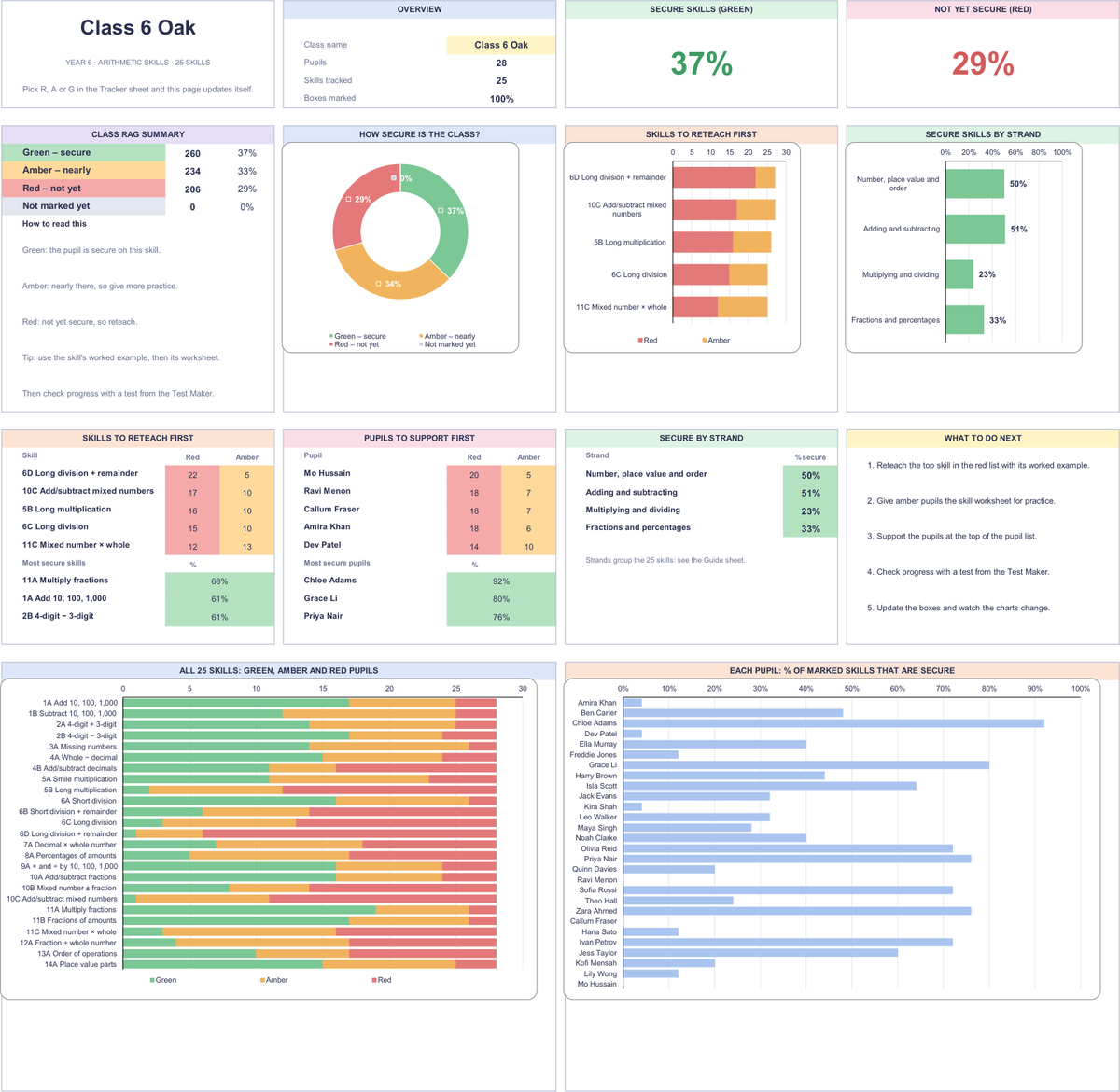
Dashboard sheet
- Skills to reteach first: the skills with the most red and amber boxes, so you can see which skill most of the class has not understood.
- Pupils to support first and the pupils doing best.
- A donut chart for the whole class, a chart for every skill, a chart for every pupil, and a score for each strand.
Use it with the rest of the arithmetic toolkit: teach each skill with its worked example, practise with the worksheet, then check progress with a test from the test maker and update the colours.
The file is an Excel workbook (.xlsx). It has been checked in Microsoft Excel. It also opens in Google Sheets and LibreOffice, but charts and colours can look different there.